Thursday, May 2, 2013

A Life in Clicks

It has to be close to 15 years ago that I was introduced to the Logitech Marble Mouse. Not the one with the blue ball, but the older, flatter one with the red ball that is no longer in production. It took less than two days to become completely enamored of this mouse's advantages: my arm could pretty much stay still and my thumb and eyes conspired to draw when needed or otherwise navigate the workstation screen. I have a pretty good idea that Logitech's device preserved my right arm from carpel tunnel syndrome (CTS) over the years of heavy use, at home as well as work.

Yes, I spend a lot of time in front of a computer. I've already written about and shown pictures of my home system. Presently, I spend my weekdays on a Lenovo Pentium Dual Core workstation that uses Windows XP. Ten years ago that would be considered the state-of-the-art OS and few PCs could touch it for performance. Maybe not the same as cat years or dog years, but computers age on a quicker scale than humans. Software groomed for use on Windows 7 and 8 has no mercy on an OS like XP. Or on the person using it, who often resorts to looking at his smartphone while waiting for the system to complete some arcane process that has frozen the screen.

It's slow. I'm back to opening Photoshop and going for coffee. I could take the elevator and buy it 18 floors away, and still find it settling in. Running with Outlook on and two browsers open is a challenge to my patience when I'm used to my laptop at home blazing away.

With time measured in such slow motion, life becomes measurable in clicks. The question to ask, particularly when you've reached my ripe age, is have I been given an unlimited number of clicks? I've been using a computer for close to three decades. The number of clicks I've performed is one of those rare times when "myriad" is not an exaggeration in measuring them. Consequences exist for those who click beyond their limitations. CTS is only one of them, I'm sure. I can feel strains in my wrist and along my arm, pinging my elbow and worming its way to my shoulder.

You would think of all people who live by clicks, developers would be among those who wage a constant fight against clicks. A Web developer certainly knows that the usability of her site rises and falls with the number of clicks it takes to get to a page. When I started my present job, one of my main duties is as Webmaster for our section's site. My war on clicks began. I can cut down the clicks it takes to get to our pages but the tools I use don't share my goals.

For instance, with a slow OS, I find myself facing this message: "You chose to end the nonresponsive program, ______." If Microsoft truly wanted me to send the report, maybe it would take into consideration the number of clicks it costs for me to do them this service. (See the next two graphics.) Maybe those boxes could just fade after a number of seconds that I am given a chance to determine with the Control Panel (or at least the administrators at the ABA).
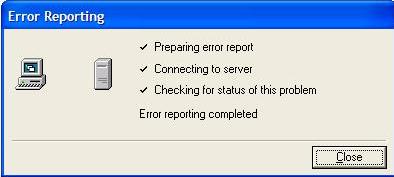
 Easy to kick Microsoft for any number of ways it adds clicks to my life. It's like kicking a pigeon.

A company that ought to know better is Adobe. I've mentioned some of these tools before. After a recent major upgrade of their CQ5 content management system, I find it appalling how little regard their developers have for trying to limit clicks for its users. The image below shows how their editing window opens up each and every time I need to make adjustments or to create a new page. Because they limit me to an editing window 12 lines deep, I need to click on each side of that box to expand it to see as much of my page as they allow.

Another editing box that am obliged to work with is how we tag content with metadata. This box works vertically as well as horizontally to provide a list of the controlled vocabulary that goes into tagging our content. To adequately tag a paper submitted by a member to our digital assets manager (DAM) takes 36 clicks. Over the three months of our Midwinter Meetings, I will post close to 400 papers. More than 14,000 clicks. I find myself using my middle finger to click sometimes ... to save wear and tear on my pointer.

Any number of solutions to this unnecessary excess of clicking comes to mind. I could copy and paste tags, or since I'm doing a batch of 20-40 papers that share the same tags, a way to process them in multiples shouldn't be that difficult to program. We're not talking about a brand new product, but one that is in version 5 and charges a beefy licensing fee for it use. Users have had plenty of time to register complaints but nothing has been done. Adobe has plenty of competition that does these things more efficiently, too. (So, yes, our IS department shoulders the culpability in my inevitable decline toward CTS. I've mentioned it to them once or twice now.)

I could mention any number of other ways that my burden of clicks could be eased by Webmasters and our IS department, but these are sufficient examples. 

I should hope by now that you have been inspired to consider ways in which you are wasting clicks on software or at favorite Websites. (As always, feel free to comment!) We pay for these things with more than dollars. We also pay in clicks.

Tuesday, February 12, 2013

My Windows Phone @ Nine Months

I've been calling my phone a retarded Windows Phone. Let's get the slander placed correctly, its the Samsung Focus Flash (SGH-i677 Windows Phone 7.5). It's the "7.5" that sticks in my craw as I cannot update it past Windows 7.1. Without 7.5, a number of appealing apps will not function: Pandora, Spotify, Jack of Tools (compass, altimeter, speedometer, etc.), this is just painful ... I've already bitched and moaned about this, so let's move on.

I have also mentioned how it has been a great help at work in dealing with mobile apps for our conference last November. I did look at iPhone and Android versions of our app with a good deal of envy, but I have hope that HTML 5-based mobile apps will level the playing field.

I have found some great apps:

Evernote. I wanted a "notepad" for remembering my library card number, being able to pull out favorite quotes, and the usual ad hoc note taking. Saved to the Cloud, I can upload notes from my PC to Evernote and have them available on my phone. Check out the website, it's a very nice free app.

I've already mentioned Klick and Accurate Tuner for use with my guitar, but needless to say, they've  made me appreciate the phone.

AmazonKindle has been another addic--useful app in getting (mostly) free e-books to read. It's a very interesting marketplace, to say the least. Another e-reader app that is very interesting, Legimi, appears to be a work of Polish developers as I see a lot of Polish links. Nonetheless, I found great downloads of Robert E. ("Conan the Barbarian") Howard works that my cousin says I must read. He would disapprove of me taking advantage of getting these works free but at least I am reading them as instructed.

Jessie bought me a Seattle Sports Dry Dock Landing Pad (see right, photo compliments of REI) that has two velcro bands that promise to allow me to mount it on my bike. I have a couple of free apps that will allow me to have a speedometer that I can look at while riding (BikeSpeedometer) and Cycle Log, a "cycle diary," which has allowed me to record average speeds, elevation changes and trip time and length. The latter worked without being mounted so I can look at it but it will be very nice to use these apps when biking season begins. (I notice that reviewers have kicked Cycle Log for less than stellar accuracy in handling altitude and distance. I may look into better apps when the season allows me to do comparisons.)

A good friend has me revisiting playing MechWarrior, which requires the use of 10-sided die. I immediately began a search of the apps, finding a half dozen of them that give you a wide variety of game dice (d4, d6, d8, d10, d12 and d20). The Dicebox RPG app from Bonehead Software was by far the best implementation of what I hoped for. Let the video tell my tale.

 
As you can see, one can roll the dice holding the phone and the dice
are visible to anyone playing. (In our game use, the total of the dice isn't important.)
None of the other apps came close to this one.


Friday, December 7, 2012

Using TripBuilder's Phone Apps

Mobile Web version
of the finished app. The
iPhone and Android
versions were gorgeous
in comparison.
Last June I was directed to work with TripBuilder about creating phone apps for our Conference in November. This had been done two years before with not a lot of enthusiasm by attendees but we felt that maybe there would be more people using smartphones this year. New territory for me, but the people at TB were great. They gave us a deadline for having a substantial amount of data flowing into their Web-based content management system (CMS) for handling the various functions for scheduling, listing speakers and attendees, creating surveys, and so forth.

I assume that the phone apps business emerged out of TB's original paper-based scheduling and pocket guides to conference cities service. A module providing a guide to the city of Atlanta was also included in the services extended by the apps: iOS (iPhones), Android, BlackBerry, and Web-based mobiles (including Windows phones and tablets) would be created. My main job was to take the logo for our conference and adapt it to numerous sizes and formats for these four applications. Associates of mine would use Excel templates downloaded from the TB CMS to insert data on sessions, speakers, attendees, exhibitors, and sponsors, as well as text for an About page. We could continue to update the CMS via these templates, however, as we got closer to the event, it was better to insert the data on attendees one by one so as to not overwrite notes that early adopters might be adding to their records.


Opening screen for the TripBuilder CMS.
We used the Section's Facebook page, monthly e-Newsletter, and Website to inform members about the apps and how to download them. To every email we sent out regarding the conference in the last weeks leading up to it, we appended a notice about the apps. By the time Conference started we had close to 200 apps downloaded for the branded phones. I could track adoptions via reports provided by the TB CMS. I also saw there had been 800 views of the mobile-based schedules, though we had no way to translate that into unique users. What really told us the apps were a success, however, was when we had more than 100 downloads during the first day of sessions. It was obvious that people were showing off their apps to friends and the friends were liking what they saw.

Graphics were uploaded and stored for use by the TB programmers. You couldn't vary from their precise size requirements by one measly pixel!

This tells me two things: we had done enough promotion to prime the pump for adoption before the conference and the apps were easy enough to learn that the early adopters wanted to show off to whomever they ran into at Conference. It's obvious that this will play well next year, since by the end of Conference we had close to a 50% adoption rate. That translates to having a sponsor and selling banner ads to run on the apps. More artwork for me to upload to their CMS next year but well worth the effort.

During Conference a decision was made to handle session evaluations online. This turned out to be about 24 on the first day, 33 on the second, and 17 on the final half day. Putting these together using our ABA Qualtrics account took about three-and-a-half hours each for the first two days and two hours for the last one, typing in each speaker's name and session titles. Instituting similar surveys via TB's CMS took me all of a half-hour! That's the power of a database-driven application kicking ass. The former set of surveys had to be emailed en masse to the attendees and they had to go from one session to the next in order to ensure they saw a survey for the sessions they attended. I got some email complaints on that!
Building surveys was a breeze with the TB CMS.
 The phone apps, first of all, allowed attendees to create their personal schedule of sessions they wished to attend. So referring to their MyScehdule, they had already eliminated sessions they hadn't attended and were able to press a button for taking the session survey. Needless to say, I'm looking forward to this aspect of the evaulation process next year!

TB is not standing on it's laurels, however. Next year, they will be able to allow our speakers to fill out their own biographies and other data to the TB CMS, which we can download for our own use (print copies, CD files). There will be an app that allows people to fill out forms and actually print out CLE certification documents for attending CLE-approved session. They are coming out with a spin-off application that will use HTML 5 to make the Web-based apps look more like the iOS apps and less like the screenshot elsewhere on this page. This app will be a 365/24/7 social networking tool.

It was great working with the TripBuilder team and I'm looking forward to continuing the relationship.

Saturday, October 20, 2012

Google No Longer Avatar Friendly?

I've been struggling in an attempt to recover the Google account for my Oberon Octagon avatar. My Google Docs, Google Calendar and Google + account will also be lost. Six years of productive use, above board board and honest, all lost due to a mistake regarding my birthdate. When I attempted to follow their steps to recover the account, I was denied. I can only conjecture at what I failed to do because no one at Google has seen fit to answer my emails.

Apparently I'm not alone as a blogger I admire greatly is also facing termination of her account. Avatar versus monolithic corporation ... outcome not promising. I've been a very strong evangelist for Google and apps. I'm about to write criticism of their terms of operation using one of their products, which I will continue to recommend.


Payment method not valid? Obviously, it wasn't matching my avatar name. But Google never explained even though I tried to contact them about it.

My personal gmail account is not backed by a credit card for certification of age or any other identification requirement. I find it disappointing that a mistake made in re-entering the birthday for my avatar account caused its closure but was Google going to contact me about my avatar's name not seeming likely to be real? Sometime down this line of reasoning would the profile picture not a be a good enough likeness of a human? (Actually, as you can see in the screenshot below, we're getting close to that actuality.)


What is the problem? Are we taking up too much space on the servers? I am disappointed. It's not like I have paid for the account but I have grown accustomed to having my mail segregated by identity: actual, virtual, business, game. I guess my business model of having a variety of email accounts is faulty.

Google provided a rationale to Botgirl Questi and actually has restored her account. As of October 19, mine is gone. However, I need an account for my avatar. I rerouted all the SL IMs for OO to my personal email account and they add up. I am beginning to find "work" in SL with speaking engagements and may still have something on the horizon that I cannot divulge at this time. So, do I Yahoo!?

What seems to be the problem? What can one little guy do about the great big corporation stepping on him? Open another account! oberon0octagon@gmail.com is now in business. Not as elegant as the previous one, but it will do. The biggest determiner here is the CalendarCogs I have in SL that require a Google Calendar. (I also had a problem with Facebook since it's set up using the old, defunct account.)

And within 24 hours, this is what happened:
Hello,
Our system has determined that the name you provided on your Google+ profile Oberon Octagon may not actually be a name.
It may be that the name you provided is that of a business you represent. Or it may be that this is actually your name and our system made a mistake.
We've got a few options for you:
  • If this is the name of a business, brand, or other organization, please sign in to your Google account and change the profile's name to a representative of the organization. You can then, while logged into this profile, create a Google+ Page for the organization. Pages are designed specifically with the needs of organizations in mind, while profiles are designed for individuals.
  • If this is your name, please sign in and follow the instructions to submit more information and help us fix our mistake.
  • If you want to change the name provided, please sign in and follow the instructions to edit your profile. You can also optionally add Oberon Octagon as a nickname, previous name, or transliterated name in addition to your common name, if appropriate.
If none of the above options are appropriate and you use your Google+ identity on YouTube, you can unlink your Google+ profile from YouTube. This will ensure that regular YouTube access will continue but your Google+ profile will be suspended until you take one of the actions above. If you manage a brand channel, we will soon have a better option for creating a Google-wide identity.
If you don't take one of these steps in the next 4 days, your Google+ profile will be suspended. While suspended, you will not be able to make full use of Google services that require an active profile, such as Google+, Reader, Picasa, and YouTube (if you use your Google+ identity on YouTube). This will not prevent you from using other Google services, like Gmail.
We're sorry for the inconvenience,
The Google+ team.
If I have access to mail and Google Calendar, I really don't give a rat's ass about Google + and YouTube for my avatar.

Tuesday, September 25, 2012

My Spiritfest Presentation

Where to post and how to post?

I've already posted the TED video by Shawn Achor that I used as part of a presentation at mid-time adult ed at First Pres and this weekend in Second Life at the International Spiritfest Weekend on my personal blog. I wasn't paid for my time but it still seems like it was a professional thing: I made a presentation, it took some technical skills, and I took the opportunity to plug my services as an avatar with spiritual director credentials as well as virtual worlds consultant. So here I am writing about it in Die/|\Hard ... if nothing else it's been too long since I've posted something here. I may post the text of my presentation, however, at Great Hot Shave (GHS), my personal blog.


I'm standing near the screen to the right. I brought a chair so my neko-oriented "stand" animations wouldn't be distracting.

At the end of August, I saw a notice posted by the Viriditas Meditation in SL group about the upcoming event. I actually saw that Isabelle Oaklourne was online, so I sent an IM expressing interest in presenting if that was possible and she told me to send a proposal pronto since they were filling up! (See my September 12 GSH post.)  I think I may have gone ahead and provided my blog post on Shawn Achor (see link in first paragraph) and mentioned I would discuss spiritual disciplines in regard to what Achor had to say.

I did this trusting that I could find a way to make the video available. It's much simpler now that one can create media objects and not have to fiddle with group affiliations and parcel ownerships. (You can build an object in SL and assign it a url as its texture, which in effect, allows you to present a Web page that can be scrolled and clicked on onto the surface of the object.) Nonetheless, when the time came to do the presentation, the staff provided the "screen," being a privileged group member* allowed me to drop in the url for my blog, and people still needed either to click on the screen to view it or grab the url to view it offworld, so to speak. I have yet to find a way to open a TED Talk video away from the TED.com site save for embedded code. I felt that it would be less distracting to access the video embedded on my blog than the TED site, which has a lot of distracting views of other related videos to the right of their screen. BTW, while it should be possible given you have the ability to click on buttons, you cannot get the full screen mode button to work on a media object (or at least it hasn't worked for me so far).
_____________
*I was made an "S F Musician" in the Lunar Lounge group so I could rez items. While I didn't need to rez my video object, I did rez a "slide" from a screen capture of the five practices that Achor recommends to shift one's attitude toward happiness. I listed them in my chat text but the slide covered the screen with the end of the video, blocking any concerted effort one might have made to access and run the video again. Just seemed like a useful thing to do.


The program included musical and dance performances as well as presentations. This was a live performance on piano. The folks in bright teal-colored shirts standing back in middle of the shot were staff, reading to change the stage for my presentation. It was a really smooth transition.

Further preparations included a notecard with my resume on it, basically what you see in my Spiritual Direction CV page here on my D/|\H blog. On another notecard I put the text of my presentation. I wasn't sure whether I would need to give it out, but I figured I would cut and paste it paragraph by paragraph as I read it. This presents a challenge for not having practiced this beforehand! I was using Voice and not certain that it would be translated, but I knew that people can have text translated automatically. So I thought it would be important to send out the text via Chat. This went somewhat smoothly, though at one point I cut text from my notecard and wasn't able to see it right away onscreen in chat. I was able to paste it back into the notecard. Often, though, I would paste into chat and forget to hit return to send it out right away. I also posted the same paragraph I'd posted previously ... on two occasions.

It probably looked smoother to the audience than it felt like for me. That's my story and I'm running with it.

My first paragraph was a disclaimer. I knew that this was an ecumenical event, so I wanted to be sure to acknowledge that I was speaking from a Christian perspective but that the principles of spiritual formation were universally applicable. I posted the paragraph while waiting to be sure folks had finished viewing the video--there was no way to know if we were all in sync in that regard. About halfway through reading it, I got a message from someone saying to the effect, It's cool, you may skip ahead! and I did.


I really hadn't timed myself but just felt there would be time--I had 45 minutes--for discussion. There was time and there was discussion! I felt energized by the experience. I was told by Isa and the person in charge of the Nirvana sim where the fest was held that I would be welcome to present again!

An interesting experience. You do not make eye contact in this kind of presentation. The screen, for one, is cluttered with the notecard text on one side and the chat readout box on the other. To scroll around to see people or even to take pictures would have been taxing my limited ability to multitask. (What I did take, of course, happened while the video played. I also was able to check out a few profiles of people attending.)

I look forward to more opportunities!

Thursday, September 6, 2012

My Next Phone


With one app after another telling me that they'd work with Win 7.5, which will not install in my Samsung, I guess I'm looking at a different company for the future. I will say that a new app, OverDrive has made me very happy, giving me the ability to download audiobooks from my library, like eMediaLibrary does on my wife's Nook. I am downloading Ray Bradbury's The Martian Chronicles and have another title on Hold.

The Windows 8 interface looks great. Not so sure about the curved glass in terms of it scratching but there are screen protectors that work well enough.

Thursday, June 28, 2012

Work Tools

I work in a cubicle on the 18th floor of a modern glass-and-steel building in downtown Chicago. I do not like fluorescent lighting and during most of my career was able to avoid it. The lighting here is indirect: rows of fluorescent lights but pointing toward the ceiling, aligned above the walls of the cubes so the light reflecting off the ceiling falls on the occupants. I'm happy.

I have some great tools to play with. I use all three of the major browsers--IE, Firefox, and Chrome--to handle my communications and work. I have Adobe Design Premium, which for me is a bit overkill on the Web editing, since I would prefer to work in code and not use so much overhead that Dreamweaver provides. Particularly when using an older Windows XP-based, Pentium DC desktop computer--it can take a long time to load. Codelobster would be just peachy. I have grown to appreciate the Search/Replace tool that allows handling very long strings and multiple documents, however.

For cropping and resizing pictures, my old standby LView Pro would be wonderful but Microsoft Office Picture Manager is fine, and if I have to save in a particular format, MS Paint is good in a pinch. So Photoshop only opens when I accidentally try to Preview a PNG or BMP file. BTW, at home, as mentioned in a previous article, I have a new laptop and because I couldn't find my registration number for LView Pro, I checked out a new down'n'dirty 64-bit paint program called Paint.Net. Since I know I've got at least two registration numbers on file with the LVP people, I was disappointed in not hearing from them when I asked them about telling me my numbers. Bad customer service doesn't get rewarded. And Paint.Net is very cool. Will write more later.

For the heavy lifting of content management, we use Adobe's CQ5. Next to Sitefinity, which I have mentioned elsewhere, this is a very good program for handling a huge Website. I like the separation of asset files--graphics, multimedia, documents--in their own database that can be shared by the organization. I have only two complaints that just make me shake my head in wonder at the arrogance of large companies like Adobe. CMS programs are not new anymore. I cannot imagine any excuse for allowing either of these limitations (see the screenshots below) to exist when charging a premium fee for the honor to be frustrated by them. Yes, there are work-arounds for them but I want to hear the reasons why these defective features are allowed. So far, I am deafened by the silence!

The file selector for the DAM (document asset module?) doesn't get any wider than this despite plenty of room for doing so. WTF? Can we spell laZy a$$ progrAmMing?


This is the editor for CQ5. As you can see, there's a lot of white space under it. Those seven lines of text is all you get to look at no matter how wide or deep you open that window! Any significant editing requires you to go into HTML mode and copy and paste to your editor of choice, and then paste it back. As a frustration bonus, any time you paste in text, the window pops you to the top line of text and you have to scroll to find where you were working. There's no excuse for this, srsly.


If it had been up to me, I would have gone with an open source CMS like Drupal, which is much more user friendly and feature rich.
We also use Listserv Maestro for handling high-volume html-based emails. Learning to use it has been easy, although it, too, has some questionable quirks. I can understand why they've done templates in such an elaborate fill-in-the-blank way but it doesn't meet my particular needs very well.

One great thing we have here is good support. It's an interesting approach but there's a digital marketing side as well as the IT side, for handling problems or needs like creating short URLs or consulting on best way to handle Web projects. Much more transparent than my last situation.